
How to Move a TV Safely: Packing, Lifting and Transport
You're staring at a TV that's too wide for your arms, a pile of cables you can't identify, and a moving day that won't wait. That's the normal starting point, and it's where most screens get damaged. People guess at the weight, grab the panel instead of the frame, or lay the set flat because it fits the car better. Learning how to move a TV well means treating it as an orientation sensitive, tip prone load, not as ordinary furniture. The work is manageable if you decide, pack, and lift in the right order.
Table of Contents
Decide Whether to Move Your TV and Prepare It - Run a Quick Triage - Prepare a TV Worth Moving
How to Pack a TV So the Screen Stays Protected - Build the Protection in Order - Close, Mark, and Test the Carton
How to Transport and Set Up a TV Safely - Secure the Trip - Set It Down and Set It Up
Deciding Whether to Move It Yourself or Hire Movers - Six Questions That Decide the Job
Decide Whether to Move Your TV and Prepare It
Before you buy a carton, decide whether this TV should travel at all. A cracked, obsolete, or unreliable set can cost more to protect and transport than it's worth, and moving it doesn't make it useful again.
Run a Quick Triage
Work through these checks while the TV is still plugged in and easy to test.
Test it properly: Power it on, play moving images and sound, and check every input you use.
Photograph existing damage: Capture cracks, dead pixels, scratches, bent bezels, and the powered screen. Clear photos prevent arguments later about when damage happened.
Compare repair with replacement: If a panel repair approaches the price of a comparable working set, don't pay to move a problem.
Check acceptance before moving day: Confirm whether a retailer or local program accepts that model, and check pickup or drop off limits while you still have time to arrange them.
Separate the small parts: Keep the remote, stand, batteries, and mounting hardware together so a recyclable set doesn't leave useful parts scattered through boxes.
That decision isn't a rare edge case in Texas. Participating manufacturer programs collected 13,287,662 pounds of televisions in calendar year 2025, and all of that collected television equipment was recycled and none was reused, according to the Texas Commission on Environmental Quality television recycling report. Texas recyclers received approximately 14.7 million pounds of television equipment in 2025 and recycled about 14.4 million pounds. Don't put a cracked screen in ordinary household trash without checking local requirements first.
Practical rule: If the set doesn't work and you wouldn't pay to repair it at the new address, don't pay to protect, carry, and store it there.
Prepare a TV Worth Moving
Power the TV off, unplug it, and remove every cable, including HDMI, antenna, optical, ethernet, and soundbar links. Photograph the rear panel before you pull anything, then label each cable with masking tape at both ends. A label that says "soundbar, TV optical port" saves real time during setup.
Remove the stand if it detaches cleanly. Put its screws in a small zip top bag, tape the bag to the back of the TV or the stand, and pack the remote separately where it can't press against the panel. If the TV is wall mounted, remove it with a second person supporting the weight while the brackets are released. Never let a dangling cable carry any part of the load.
Measure the TV, then measure doorways, stair turns, hallway corners, and the vehicle opening. Width alone isn't enough, because the boxed depth and the angle at a turn often decide whether the route works. Clear shoes, toys, rugs, and packed boxes from the path. You should finish with an unplugged, photographed TV, labeled cables, secured hardware, and a route you know fits.
Weights and Handling Plans for Each TV Type
Screen size alone gives you a poor lifting plan. A small tube TV can outweigh a much larger modern set, and its balance is worse. Use the type first, then the size.
TV type and size | Weight | Handling plan |
|---|---|---|
CRT (tube) 19 inch | 40–60 lb | Two people |
CRT (tube) 27 inch | 76–94 lb | Two people or a dolly with straps |
CRT (tube) 32 inch | 106–163 lb | Two people with a dolly or lifting equipment |
Flat screen 19 inch | About 6.5 lb | One person, carried upright |
Flat screen 26 inch | About 10 lb | One person, carried upright |
Flat screen 32 inch | About 18.75 lb | One person, carried upright |
LG OLED 55 inch | 21.3 kg boxed | Two people, carried upright; packed 1,360 × 810 × 187 mm |
LG UHD 65 inch | 22.4 kg boxed | Two people, carried upright; packed 1,580 × 950 × 162 mm |
In testing published by the U.S. Consumer Product Safety Commission, tested 32 inch CRT sets weighed 106–163 pounds, while tested flat screen televisions weighed 18.75 pounds at 32 inches. The same testing found CRT sets are heavier toward the front because of the cathode ray tube, which makes them more likely to fall forward when tilted beyond their stability point. That's why a tube TV shouldn't be balanced on one person's forearms or tipped to squeeze through a door.
For a CRT, keep the screen facing a padded, stable surface during staging, strap the body to a dolly, and move slowly over thresholds. One person guides while the other controls the dolly. If the set has no clean grip on both sides, treat it like the awkward heavy items covered in this guide to moving a gun safe safely, where equipment and route planning matter more than effort.
Modern sets create a different problem. They're lighter, but their size makes them hard to grip without twisting the frame. A 2025 55 inch LG OLED television has packaging dimensions of 1,360 × 810 × 187 millimeters and a packaging weight of 21.3 kilograms, according to LG Electronics specifications for that model. A 2025 65 inch LG UHD television has packaging dimensions of 1,580 × 950 × 162 millimeters and a packaging weight of 22.4 kilograms, according to LG Electronics specifications for the 65 inch model.
Plan around the boxed weight and boxed size, not the bare panel. Stairs, landings, and parking distance turn a manageable carton into a risky carry. Any flat screen at the larger end of that range, and any tube set, calls for two people who can hold the rigid frame and keep the load vertical.
How to Pack a TV So the Screen Stays Protected
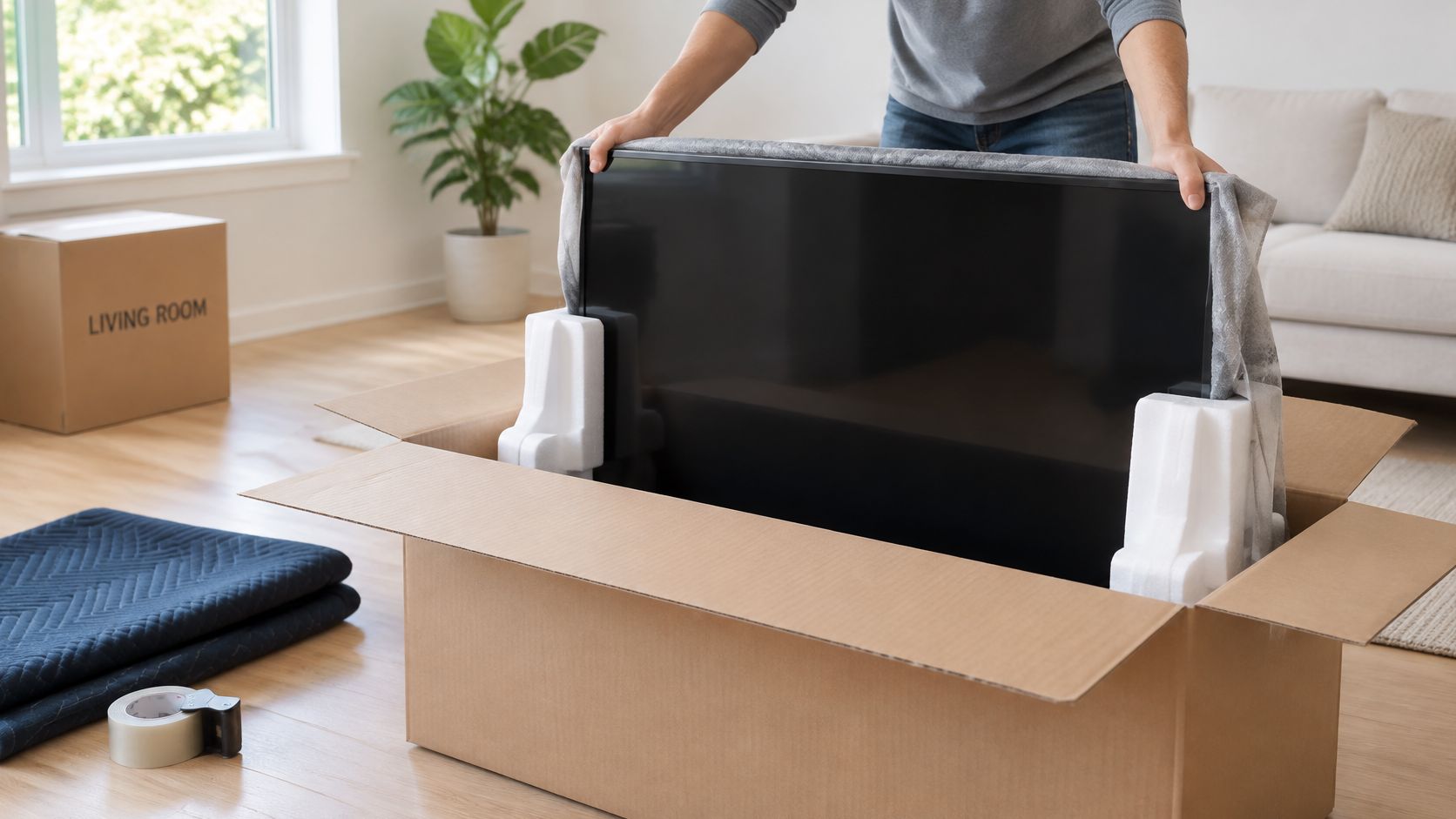
A moving blanket stops scratches. It doesn't stop a knee, toolbox, or carton corner from pressing into the panel. Good packing creates a rigid shell around the TV and holds the frame so the screen carries no load.
Build the Protection in Order
Start with the original carton and molded foam inserts if you still have them. Inspect the foam for cracks, crushed corners, and missing pieces. Compressed foam looks intact but no longer absorbs impact well, so replace damaged sections with firm foam blocks that contact the frame, not the glass.
If the original box is gone, buy a purpose built TV carton matched to the set's height, width, and depth. An oversized carton isn't safer. Slack lets the TV gain momentum inside the box, then stop suddenly against a corner. Choose a carton that allows protective material around the frame without letting the panel wander.
Next, fit foam corner protectors to all four corners. Corners take the hits at door frames and vehicle walls, and they're also strong points where support can be applied safely. Keep tape off the screen and bezel finish.
Place a clean, non abrasive screen cover over the panel. A soft foam sheet or clean microfiber layer works if it isn't pulled tight. Then add rigid cardboard or foam boards to the front and back, sized to rest against the protective structure around the frame. They must not bow inward and touch the panel when the carton is closed.
That layering matters because panels fail from more than drops. LG technical guidance for large televisions specifies lifting only from the rigid side and bottom frame, keeping large TVs upright, and avoiding jolts, excessive vibration, or frame flexing. The principal risks are point pressure, torsional bending, impact, and vibration.
Close, Mark, and Test the Carton
Close every seam with strong packing tape. Add straps only tight enough to keep the carton from shifting or opening. Over tightening can deform the box and transfer pressure to the display, which defeats the rigid boards you just installed.
Mark up arrows and "This Side Up" on at least two sides. Identify the screen side clearly so nobody leans the carton against a hard edge or stacks a box against it. Labels don't protect the TV by themselves, but they prevent a helper from guessing.
Now test the packed result.
Gentle shake test: Move the sealed carton slightly. If you hear or feel the TV shifting, reopen it and add frame support.
Side pressure test: Press lightly on the carton walls. They should feel supported, not springy over an empty void.
Lift point test: Confirm two people can lift from the carton base without squeezing the middle of the panel area.
Accessory check: Make sure no remote, stand leg, screw bag, or power brick is loose inside where it can strike the screen.
Avoid the common shortcuts. Don't pull bubble wrap or stretch wrap tight directly against an OLED panel. Don't pack the TV face down because the carton seems stronger that way. Don't fill empty space by stuffing soft material against the glass. Soft fill belongs around the frame and in structural voids, while the panel stays unloaded.
If the TV can move inside its carton, the carton is a container, not protection. Add support until the set stays still.
Once sealed, keep the carton upright and away from tools, paint cans, and loose cargo. Record the model and visible condition on your moving inventory. That note helps you inspect the same points after arrival instead of relying on memory.
How to Transport and Set Up a TV Safely
Transport is where packing either proves itself or fails. The TV needs to stay upright, restrained, and separated from cargo that can slide. It also needs to stay out of places where it can topple onto someone while you're loading, unloading, or deciding where it belongs.
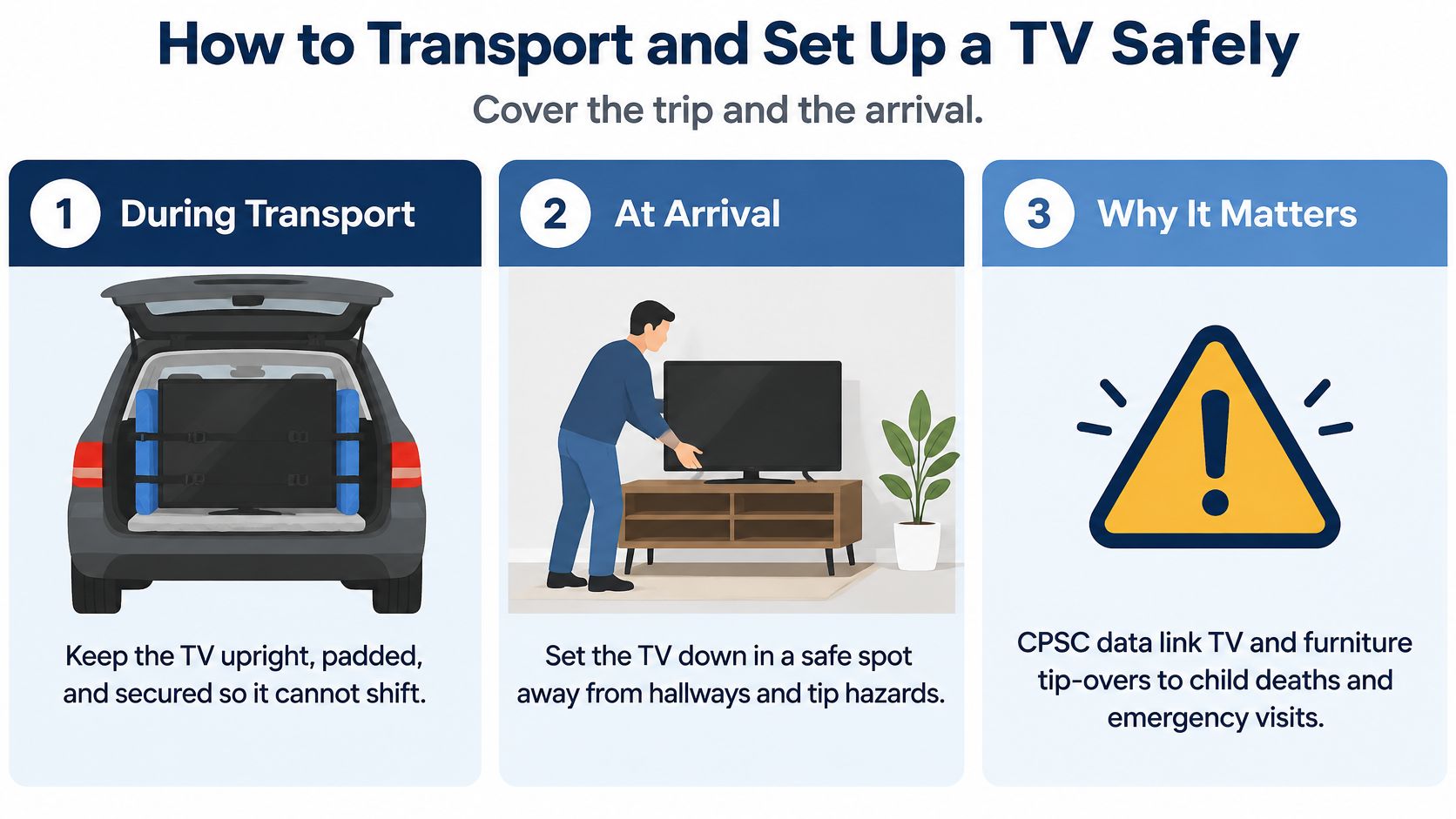
The CPSC tip over report recorded 581 reported fatalities involving television, furniture, or appliance tip overs from 2000 through 2020, and 472 victims, 81 percent, were children aged 17 or younger. Across 2018–2020, an estimated annual average of 22,500 people received emergency department treatment for tip over injuries. A TV staged in a hallway is therefore a safety hazard, not just an object waiting for installation.
Secure the Trip
Load the carton upright against a flat vehicle wall or a stable seat back. Strap it to a fixed anchor point, with padding between the strap and carton so the strap doesn't cut in or crush a corner. Block the base so it can't slide forward during braking.
Keep the screen side away from tools, loose boxes, and furniture legs. In a moving truck, place the carton where other items support its position without pressing into its face. In a pickup, keep it in a rigid carton, protect it from weather, and secure it so wind and road vibration can't work it loose. A blanket under an unboxed TV in a truck bed isn't an acceptable substitute.
Carry the set upright on stairs with one person at each side. The stronger person takes the lower end, both people communicate before each step, and nobody twists to look backward while holding the frame. For OLED models especially, don't push, press, or lean on the screen to steady the load. Use the rigid bottom edge and side frame only.
Never lay a TV flat because the drive is short. Flat or sideways transport can concentrate stress through the frame and panel, and cargo placed on top makes the risk worse. If the vehicle can't carry the carton upright, use a different vehicle. Our guide to loading and unloading help covers the point where rented truck space still needs trained hands for awkward loads.
Set It Down and Set It Up
At the destination, place the TV on a sturdy, low base and push it as far back as practical. Anchor the TV and supporting furniture to the wall where feasible, especially in homes with children. Don't balance it on a narrow stand while you search for cables.
If the TV arrives cold or damp, leave it unplugged until it reaches room temperature. Inspect the panel, corners, ports, frame, and stand before reconnecting anything. Then attach the stand or mount, connect labeled cables, and power it on only after the set is stable.
For temporary storage, keep the boxed TV upright on a pallet or firm base, away from walkways and children's play areas. Don't lean it against a garage wall where a bicycle or storage bin can knock it forward.
Deciding Whether to Move It Yourself or Hire Movers
The right decision isn't based on screen size alone. It's the combination of the TV, the route, your help, and everything else moving that day. Answer these questions carefully before you commit to doing it yourself.
Six Questions That Decide the Job
What type and size is it: A tube set or a large flat screen changes the crew and equipment you need.
What does the route involve: Stairs, tight landings, narrow corridors, elevators, long walks, and limited parking all increase handling time.
How far is it going: A local room to room move gives you control. A long distance move adds vibration, repeated handling, and stricter packing demands.
Who is helping: You need a second adult who can lift steadily and follow instructions, not whoever happens to be nearby.
What packaging do you have: The original carton lowers risk. A missing box means buying the right carton and rigid protection.
What else is moving: Fatigue matters. A TV carried after sofas, mattresses, and appliances is more likely to be rushed or gripped badly.
If you have stairs, a large set, and no reliable second adult, hire the lift. That isn't overkill. It's the point where one misstep can hurt a person and destroy the panel in the same motion. I would rather see a homeowner pack cables and accessories carefully, then pay for the heavy carry, than improvise with an unwilling helper.
Decision rule: If you can't keep the TV upright, gripped by its frame, and under control for the entire route, don't carry it yourself.
Apartment and condo moves need the route settled before anyone lifts. Webster Moving Co. asks customers to let them know about stairs, elevators, loading areas, gate codes and parking restrictions so they can plan accordingly. Webster Moving Co. handles apartment moves and can work with stairs, elevators, parking restrictions, furniture disassembly and reassembly, and other apartment moving logistics. If you're comparing service levels, this overview of full service movers explains what changes when packing and transport are handled together.
Before a crew arrives, customers must ensure driveways, entrances, and elevators are accessible, all boxes are properly packed and labeled before the move, and someone over 18 years of age is present during pickup and delivery. Reserve the elevator if your building requires it, confirm loading area hours, and tell the mover about gate codes before the truck is sitting outside.
Your practical next step is simple. Measure the TV and every turn on the route, write down the stair and elevator details, and decide whether you'll pack the set yourself. Then request a quote for the exact lift and transport you need, with the TV listed as a separate fragile item rather than buried in a general furniture count. That gives the mover a chance to plan crew size, equipment, and vehicle placement before moving day.
Doing it yourself makes sense for a smaller flat screen, a short level route, proper packaging, and a dependable helper. Hiring help makes sense when the set is large, the route is awkward, the box is missing, or the TV is only one of several difficult items. Don't let pride turn a controlled two person job into a solo carry down wet stairs.
If your TV is large, wall mounted, or coming out of an apartment with stairs and tight parking, Webster Moving Co. can plan the route, protect the set, and handle the heavy lift as part of a residential, apartment, long distance, or specialty item move. Tell us the screen size, access details, and whether you still have the original carton, and we'll build the crew and equipment plan around it. Visit Webster Moving Co. to request a no obligation quote before moving day.
Comments